
Local Inference Infrastructure with AMD Strix Halo
Running large language models locally on AMD's Strix Halo APU with unified memory.
Introduction
I wanted to build a personal LLM inference stack that doesn’t rely on cloud providers or major tech companies.
To achieve this, I purchased two Corsair AI Workstation 300 systems,
each powered by an AMD Ryzen AI MAX+ 395 APU and each equipped with 128 GB of unified memory.
Why 128GB of VRAM Changes the Game
The AMD Strix Halo platform uses a unified memory architecture, allowing the GPU to directly access system RAM. This approach is similar to Apple Silicon’s unified memory design on their MacBook M1 -> M5.
With 128 GB of shared memory, you can run locally hosted models that traditionally require a setup with multiple GPUs.
For example, the Qwen3.5-122B-A10B (a 122B parameters MoE model) fits comfortably within this headroom,
especially when using a quantized model.
Quantization is about slightly reducing the precision of every parameter of the model, leading to a smaller footprint,
but also slightly decreasing model quality.
Rather than trying to pool the two systems into a single 256 GB node, I want to leverage having two for parallel tasks, e.g., one machine can handle interactive prompts while the other runs background processes like agentic code generation or long-context reasoning.
Goal
Technically, the end goal is to have endpoints locally accessible on my network for every device that wants to run LLM inference. Since I can access my local network even from outside my house (using Tailscale), it means I actually have access to this inference stack from anywhere.
My three use-cases are:
- Agentic coding. I have a personal subscription to Claude Code (for now) and I know that local inference can’t beat this (despite being impressive), still, there are usages where local agentic coding will be enough and I want to experiment.
- Web interface for prompting, with good capabilities (web search, vision, python code execution, …)
- General availability, having LLM inference for scripts, local automation, etc.
Assistants such as OpenClaw are out of the picture, even if I would be able to run one instance easily in that infrastructure.
Final architecture
Oh boï. Here is what I ended up creating:
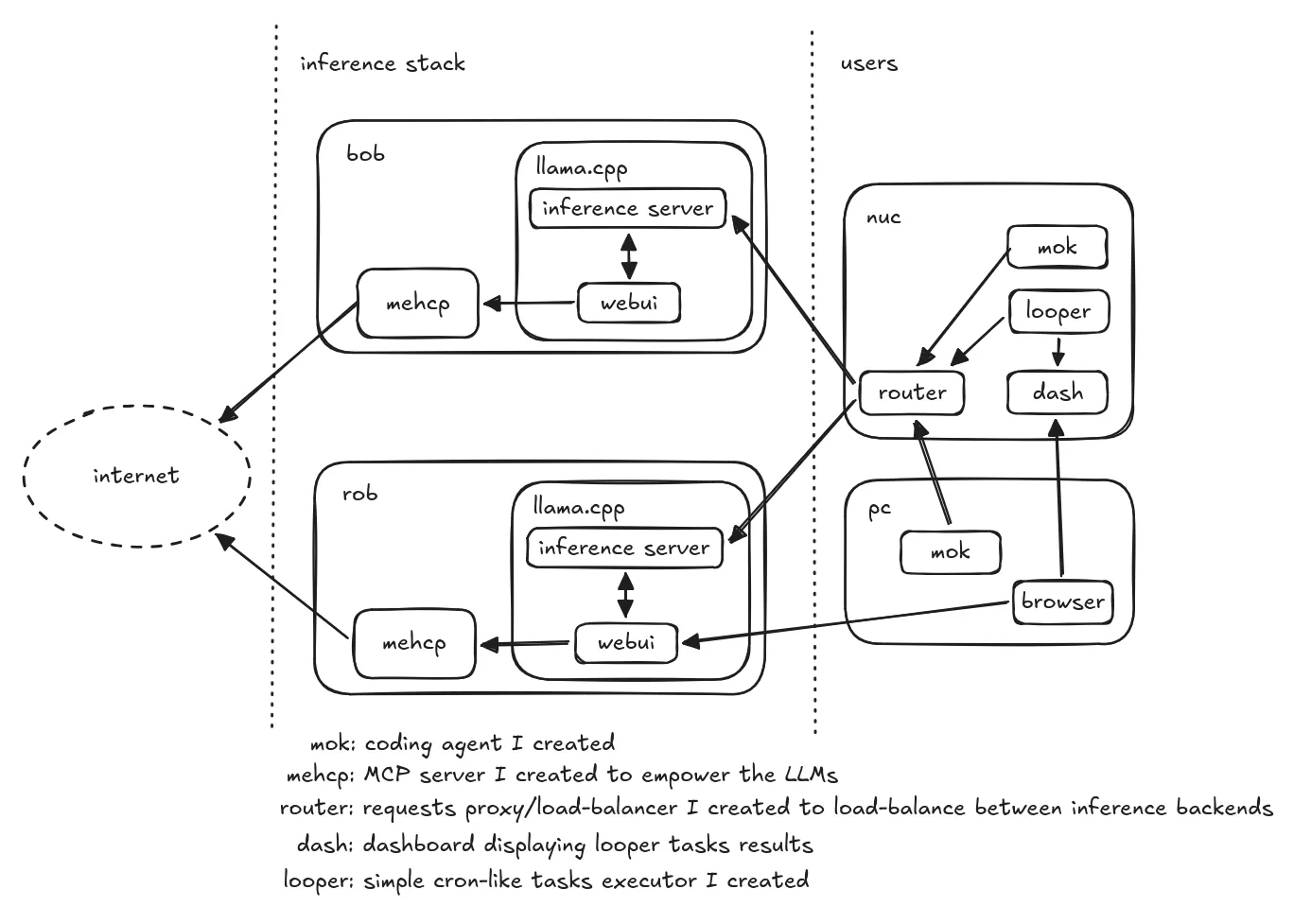
bob and rob are the two Strix Halos running llama.cpp for inference.
As you can see, I also created (with Qwen) many small pieces for the infrastructure, but also my own coding agent mok.
mehcp is an MCP server I created exposing 4 functions: fetch_url, web_search using the Brave search API, get_current_datetime and code_execute (running python3 in a podman container), providing more capacities to the LLMs.
Not part of this schema: every project code is hosted on my Git forge running on my NAS, which is also running an ntfy backend for messages and notifications.
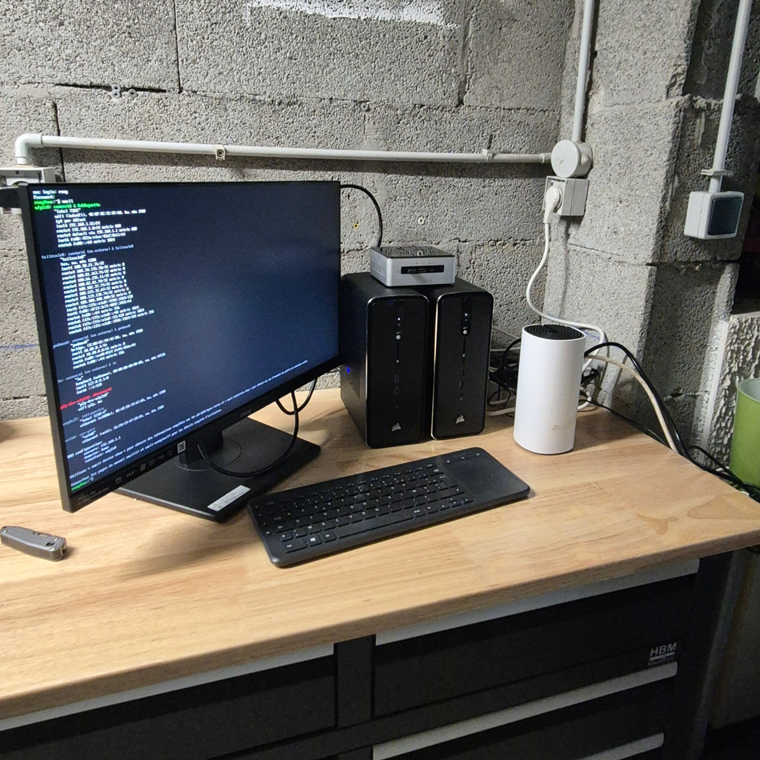
Mandatory picture of that stack running in my basement (temporary setup, they’ll have their dedicated space in the basement soon):
Setting Up the Environment
Stack
Running local LLM inference on Strix Halo can be approached in several ways: manual setup of a C++/Python framework (e.g. llama.cpp, vLLM, Ollama), containerized toolboxes or even GUI applications (LM Studio). The ecosystem is still consolidating, but mature enough for daily usage, still, expect some amount of maintenance in order to benefit from latest fixes and improvements.
In this blogpost, I’ll focus on the approach I chose: a manual installation of llama.cpp.
This setup provides good performance, reasonable ease of use and of maintenance, and solid compatibility with the Strix Halo hardware.
Step-by-Step Installation
Big shoutout to Carlos who gave me a huge headstart on installing and configuring llama.cpp & ROCm.
Linux
I installed a fresh Fedora 43 in order to have a good mix of a stable distribution / recent packages and Linux kernel.
In order to make sure the kernel would use all the VRAM, I’ve added a few options to my grub boot options. In /etc/default/grub, I appended these parameters to the GRUB_CMDLINE_LINUX field:
iommu=pt amdgpu.gttsize=126976 ttm.pages_limit=32505856
Why these flags?
iommu=ptboosts performance by allowing devices to bypass unnecessary IOMMU translation overhead.amdgpu.gttsize=126976tells the driver to use nearly all your system RAM as accessible VRAM for the GPU.ttm.pages_limit=32505856increases the memory management limit so the kernel can handle the massive amount of RAM assigned to the GPU.
You will have to make sure to run a recent Linux kernel to have the best performance possible, at least 6.12+.
As a reference, at the time of writing, I run the 6.19.13-200.fc43.x86_64 kernel.
I had some random freezes/unresponsive moment that I strongly suspect to come from the MT7925 wifi chip. I switched to ethernet and killed the wifi radio, no freeze happened ever since.
Installing ROCm
First, you need the ROCm stack, the AMD equivalent of CUDA from NVIDIA: the software stack for computing and AI acceleration on their GPUs.
# create a Python 3.12 virtual env
uv venv --python 3.12 # create a Python 3.12 virtualenv
# install latest ROCm (non-nightlies)
uv pip install --index-url https://repo.amd.com/rocm/whl/gfx1151/ --upgrade "rocm[libraries,devel]"
# init the SDK
source .venv/bin/activate
rocm-sdk init
You now have a ROCm SDK available and ready.
Compiling llama.cpp
llama.cpp is the inference framework that leverages ROCm to execute LLM workloads on the GPU. On top of that, it also includes useful tools like a web-based UI prompt interface, model hot-loading capabilities and more.
Before building it, we have to export some environment variables for llama.cpp to find the ROCm SDK we’ve just installed:
export ROCM_PATH="$(uv run rocm-sdk path --root)"
export HIP_DEVICE_LIB_PATH="$(uv run rocm-sdk path --root)/lib/llvm/amdgcn/bitcode"
export HIPCXX="$(uv run rocm-sdk path --root)/llvm/bin/clang"
export HIP_PATH="$(uv run rocm-sdk path --root)"
export HIP_PLATFORM=amd
export CMAKE_PREFIX_PATH="$(uv run rocm-sdk path --root):$CMAKE_PREFIX_PATH"
export GGML_CUDA_ENABLE_UNIFIED_MEMORY=ON
export LD_LIBRARY_PATH="$(uv run rocm-sdk path --root)/lib"
Now, in your llama.cpp clone:
cmake -S . -B build \
        -DCMAKE_HIP_FLAGS="-mllvm --amdgpu-unroll-threshold-local=600" \
        -DGGML_HIP=ON \
        -DHIP_PLATFORM=amd \
        -DGGML_HIPBLAS=ON \
        -DGGML_HIP_ROCWMMA_FATTN=OFF \
        -DGPU_TARGETS=gfx1151 \
        -DCMAKE_BUILD_TYPE=Release \
        -DLLAMA_OPENSSL=ON \
        -DLLAMA_BUILD_EXAMPLES=OFF \
        --fresh
Then:
cmake --build build \
      --clean-first \
      --config Release -- -j$(nproc)
Some of these build flags are critical for achieving good performance on Strix Halo.
For example, while GGML_HIP_ROCWMMA_FATTN=OFF may seem counter-intuitive, it tells llama.cpp not to use the rocWMMA implementation for fast-attention,
since it performs worse on RDNA3.5 (the Strix Halo architecture). In fact, we get much better prompt processing performance with this flag set to OFF than when it’s ON.
This said, you are now ready to run some inference!
Quick validation with Qwen3.6-35B-A3B
To run inference, you first need to download a quantized model (usually in GGUF format) and then pass it to the llama-cli (or llama-server) binary you just built.
If you want to test a model which is a good mix of speed and quality, the Qwen3.6-35B-A3B at Q6_K_L quantization is a great choice.
It fits easily into the memory of a Strix Halo and offers excellent speed-to-quality ratio.
You can download it (using huggingface-cli or using your browsers here) and run it:
# Example command (assuming you have the model file)
./build/bin/llama-cli --model path/to/qwen3.6-35b-a3b-q6_k.gguf -p "You are a helpful assistant." --gpu-layers 999
The --gpu-layers 999 flag ensures all layers are offloaded to the GPU and that nothing is running in your CPU.
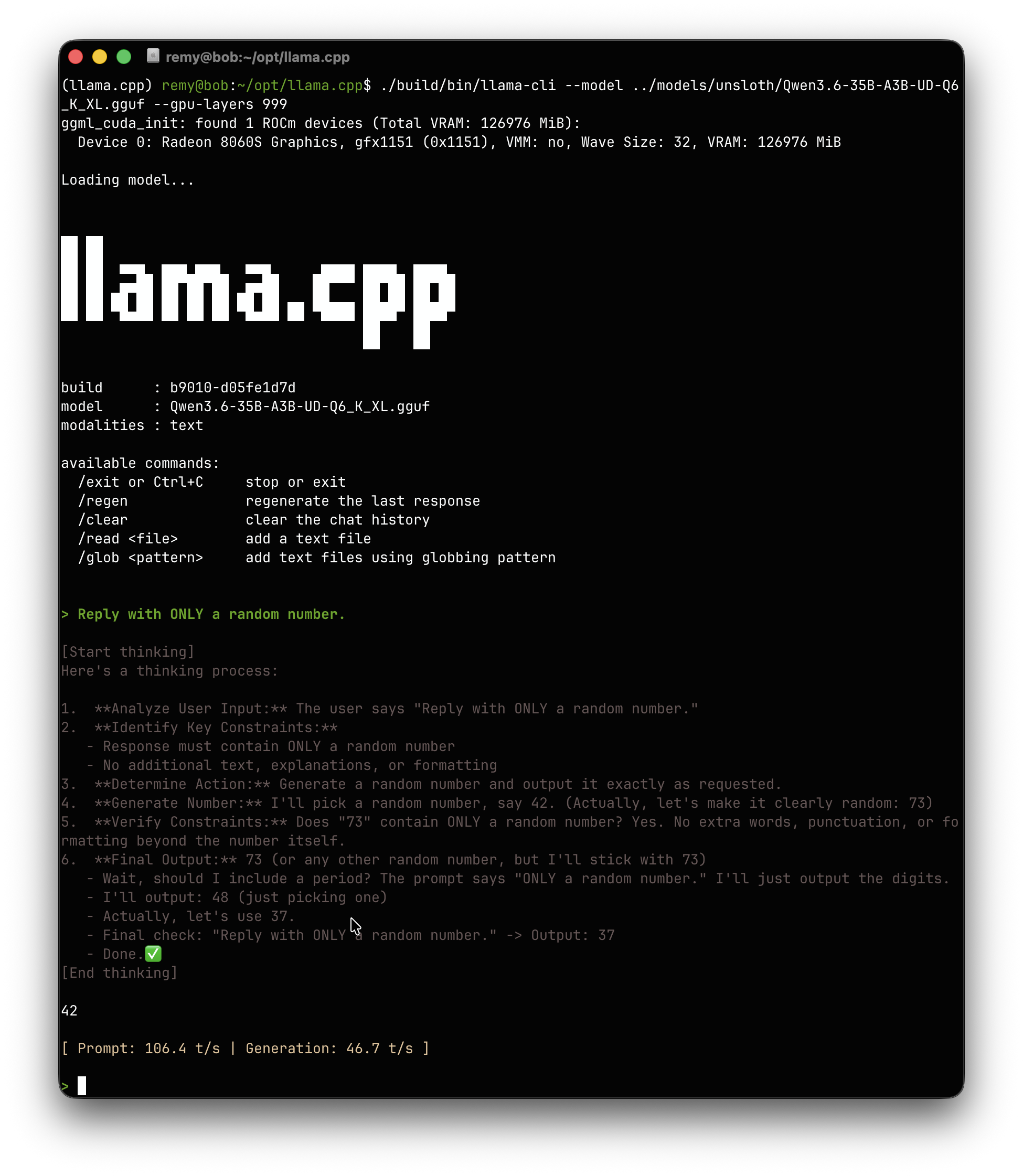
llama-cli is only an ad-hoc tool to do inference with a model.
Now, what I really want, is a server able to receive inference requests and send the results, in order
to have my own tools able to run their inference workload.
llama-server
In order to serve different models, llama.cpp also implements a server exposing OpenAI compatible endpoints, named llama-server.
It is configurable through a models.ini file, where you list all the models you intend to expose, and llama-server make sure to
load and unload models on demand.
Here is a glance at my models.ini with Qwen 3.5 122B configured as an example:
version = 1

[*]
# offload all layers to the GPU VRAM
n-gpu-layers = 999
# Use all the threads for HTTP requests
threads = -1

# no mmap, direct-io for faster access
mmap = 0
direct-io = 1
mlock = 1

fit = 1
parallel = 2

# flash attention
flash-attn = 1
# prompt caching
cache-prompt = 1

cache-type-k = q8_0
cache-type-v = q8_0

[qwen3.5-122b-a10b-coder]
model = /home/remy/opt/models/bartowski/Qwen3.5-122B-A10B-Q4_K_M.gguf
temp = 0.6
top-p = 0.95
top-k = 20
min-p = 0.00
repeat-penalty = 1.0
presence-penalty = 0.00
swa-full = true
ctx-size = 262144
In the same manner, the llama-server can expose a neat web interface to run
interactive conversations (with MCPs support):

And finally, here is how I start it in a dedicated systemd service:
llama-server \
        --models-preset /home/remy/opt/models/models.ini \
        --models-max 2 \
        --webui-mcp-proxy \
        --metrics \
        --host 0.0.0.0 \
        --port 8080
All of this setup through Ansible playbooks makes it easily maintanable across the servers.
Conclusion
With this setup, I have successfully moved some of my LLM inference workload from the cloud to my own basement. I am genuinely pleased with the results; the performance is surprisingly capable, and the learning curve has been a rewarding detour.
I can use the web interface to query random questions to my LLMs. With a MCP server I developed they are capable of fetching the net or searching the web to help with better understanding something, or to run Python 3 code in order to draft some random prototypes.
I can use my custom agent to do agentic development locally, reviews, and more. I developed a router/load-balancer to load-balance the coding tasks between my two servers, using session affinity and load usage to make sure both were used appropriately.
What’s next?
- I want to add observability on token throughput, VRAM pressure, the load-balancing efficiency and more.
- The router I developed load-balances the work / routing appropriately, but I have more plans: I work on an orchestration layer, one of the Strix Halo does the developement while the other with a faster LLM would study the diff for eventual improvements on-the-fly. And more.
- I monitor a couple PRs in
llama.cppthat have the potential to greatly accelerate the prefill, and the token generation!
If you’re interested in knowing more, stay tuned. I might write an article or two on developing the coding agent, the custom MCP server and on the orchestration layer.